How to Merge Multiple PDF Files into One Online for Free
By Doffl Team · 7 min read
In today's digital world, managing documents efficiently is key to productivity. Whether you're a student compiling research papers, a professional submitting reports, or a business handling invoices, the ability to combine multiple PDF files into a single, organized document is incredibly useful. This guide will walk you through how to merge multiple PDF files into one online for free, making your document management simpler and more streamlined.
Imagine you have several chapters of a book, various receipts for a GST filing, or different sections of a project proposal, all saved as individual PDF files. Instead of sending or managing them separately, merging them into one cohesive document makes sharing, printing, and archiving much easier. Let's explore why this is important and how you can achieve it effortlessly with Doffl's online tools.
Why Merge PDF Files?
Merging PDF files offers numerous advantages, enhancing convenience, organization, and professionalism.
Improved Organization
Having a single PDF file for a related set of documents significantly reduces clutter. Instead of searching through multiple files, everything you need is in one place. For instance, if you're a student, you might merge your assignment brief, research notes, and final submission into one PDF for easy reference. For businesses, combining monthly reports, financial statements, or client contracts into a single file can simplify record-keeping.
Easier Sharing and Distribution
Sending one large PDF is often more convenient than sending multiple smaller ones. It reduces the chances of missing attachments and simplifies the recipient's experience. Think about applying for a job: merging your resume, cover letter, and certificates into one PDF ensures the hiring manager receives all necessary documents in a single, organized package.
Simplified Printing
When you need to print a set of related documents, merging them into one PDF means you only have to send one print job. This saves time and avoids potential errors that can occur when printing multiple separate files, such as incorrect page ordering or missing pages.
Professional Presentation
Presenting a single, well-structured PDF project report or proposal looks far more professional than a collection of disparate files. It demonstrates attention to detail and a commitment to clarity.
What to Look for in an Online PDF Merger Tool
When choosing an online tool to merge your PDF files, consider the following factors:
- Free Access: Is the core functionality available without cost or hidden fees?
- Ease of Use: Is the interface intuitive and straightforward, even for non-technical users?
- Security: Does the tool ensure the privacy and security of your uploaded documents?
- No Software Installation: Can you use it directly from your web browser without downloading any programs?
- File Size Limits: Are there reasonable limits on the number or size of files you can merge?
- Order Customization: Can you easily reorder the PDFs before merging them?
- Quality Preservation: Does the merged PDF maintain the original quality and formatting of the individual files?
Doffl's PDF Toolkit meets all these criteria, offering a secure, user-friendly, and free solution for merging your PDF documents online.
How to Merge Multiple PDF Files into One Online for Free Using Doffl's PDF Toolkit
Merging your PDF files with Doffl is a simple, straightforward process. Here’s a step-by-step guide:
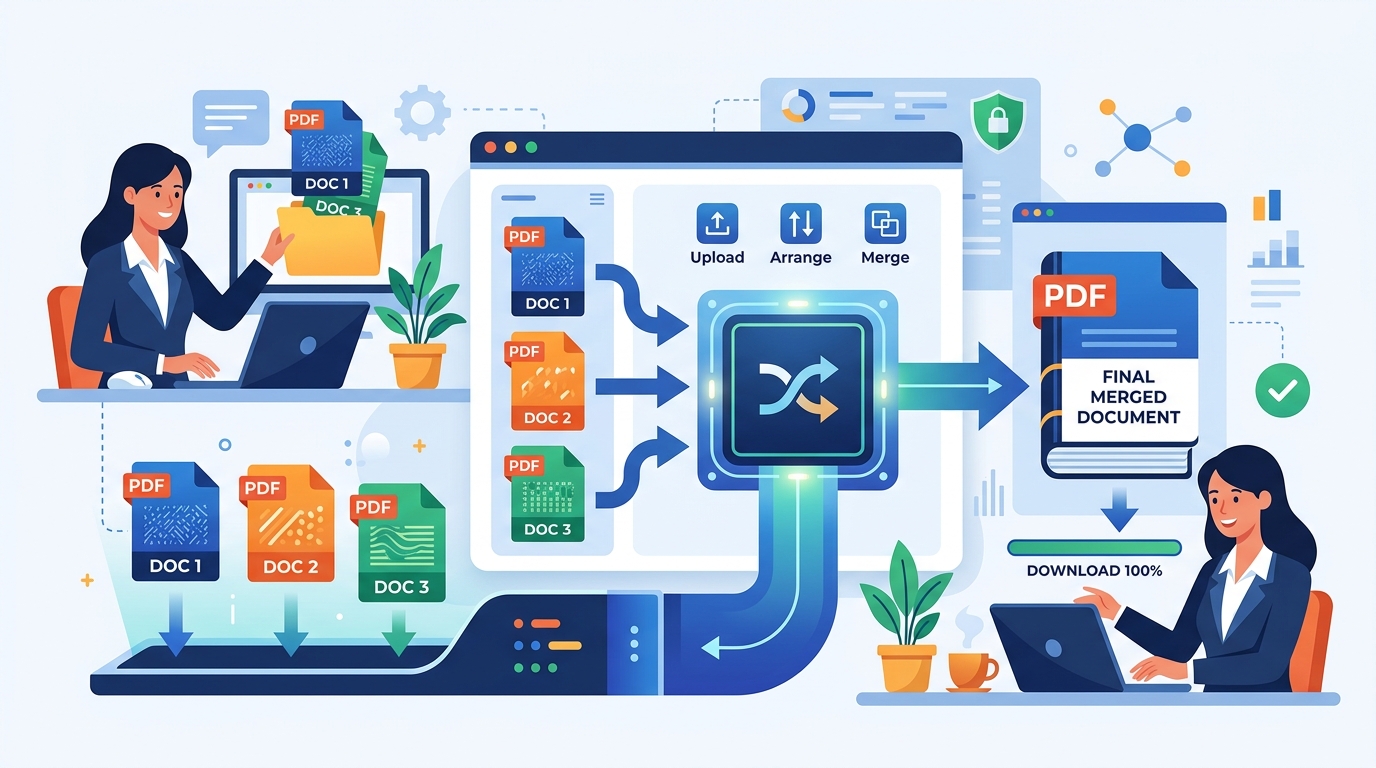
- Navigate to Doffl's PDF Toolkit: Open your web browser and go to the PDF Toolkit page on Doffl.com.
- Select the 'Merge PDF' Option: Within the toolkit, you'll see various PDF tools. Look for and click on the 'Merge PDF' option.
- Upload Your PDF Files: You'll be prompted to upload the PDF files you wish to merge. You can usually do this in a few ways:
- Drag and Drop: Simply drag your PDF files from your computer's folder directly into the designated upload area.
- Click to Upload: Click on the 'Upload Files' or 'Choose Files' button and select the PDFs from your computer's file explorer. You can select multiple files at once.
- Arrange the Order (Optional but Recommended): Once your files are uploaded, they will appear as thumbnails or a list. This is a crucial step! Most tools allow you to drag and drop these files to arrange them in the desired order for the final merged document. For example, if you're combining chapters, ensure they are in chronological order (Chapter 1, Chapter 2, etc.).
- Initiate the Merge: After arranging your files, click the 'Merge' or 'Combine' button. The tool will then process your files and create a single PDF document.
- Download Your Merged PDF: Once the merging process is complete, a download link will appear. Click it to save your newly combined PDF file to your computer. You can then open and review the file to ensure everything is in the correct order and format.
That's it! In just a few clicks, you've successfully merged multiple PDF files into one, all for free and without needing to install any software.
Practical Examples of Merging PDFs
Let's consider a few real-world scenarios where merging PDFs comes in handy:
- Academic Submissions: A university student in India might need to submit a thesis that includes an introduction, literature review, methodology, results, discussion, and bibliography, each saved as a separate PDF. Merging them into one file ensures a coherent submission.
- Business Reports: A small business owner compiling a quarterly financial report might merge individual PDFs of sales figures, expense reports, and profit/loss statements into a single, comprehensive document for their stakeholders or for tax purposes.
- Legal Documents: Lawyers often deal with multiple exhibits, affidavits, and case notes. Combining these into a single PDF for a court filing can save time and prevent errors.
- Travel Itineraries: Before a trip, you could merge your flight tickets, hotel bookings, visa documents, and travel insurance into one PDF accessible on your phone or printed as a single booklet.
- E-books and Manuals: If you download different sections of an e-book or a product manual, merging them creates a complete, easy-to-read document.
Beyond Merging: Other Useful PDF Tools on Doffl
While merging is a powerful feature, Doffl offers a suite of other free PDF tools that can further enhance your document management. After you've merged your files, you might find these useful:
- PDF Compressor: If your merged PDF file is too large for email attachments or storage, you can use the PDF Compressor to reduce its size without significant loss of quality.
- PDF/Image Crop & Paste: Need to extract a specific section or image from your merged PDF? This tool allows you to crop and paste content with ease.
- PDF Bookmarking: For very long merged documents, adding bookmarks can greatly improve navigation, allowing readers to jump to specific sections quickly.
- Excel to PDF Converter: Often, data starts in Excel. If you have data in spreadsheets that you want to include in a PDF report, you can convert your Excel files to PDF first and then merge them with other documents.
- Online Results Announcement: While not directly a PDF manipulation tool, this platform allows institutions to manage exam results and provide students with downloadable PDF results. This demonstrates Doffl's commitment to comprehensive digital document solutions, often involving PDFs.
These tools, combined with the merge functionality, provide a complete ecosystem for handling your PDF documents efficiently and professionally.
Security and Privacy Considerations
When using any online tool, especially for sensitive documents, security and privacy are paramount. Doffl prioritizes user data protection:
- Data Encryption: All data transferred to and from Doffl's servers is encrypted, ensuring your documents are secure during upload and download.
- Temporary Storage: Files uploaded for processing are typically stored temporarily and deleted from servers after a short period, once the task is complete or after a set time, ensuring your data isn't permanently held.
- No Content Review: Doffl does not review or access the content of your documents for any purpose other than to perform the requested operation (like merging or compressing).
Always use reputable online tools like Doffl that clearly state their privacy policies. Avoid tools that seem suspicious or require unnecessary personal information.
Conclusion
Learning how to merge multiple PDF files into one online for free is an invaluable skill for anyone dealing with digital documents. It simplifies organization, streamlines sharing, and enhances the professionalism of your work. With Doffl's user-friendly PDF Toolkit, this essential task is not only free but also quick and secure. Stop wrestling with scattered files and start enjoying the convenience of consolidated documents.
Ready to organize your documents? Try Doffl's PDF Toolkit today and experience the ease of merging your PDF files!
Tags: PDF, Merge, Online Tool, Free, Productivity