How to Sign a PDF Online Without Printing It: A Modern Guide
By Doffl Team · 7 min read
In today's fast-paced digital world, the need to sign documents quickly and efficiently has never been greater. Gone are the days of printing a PDF, signing it by hand, scanning it back into your computer, and then emailing it. This cumbersome process is not only time-consuming but also environmentally unfriendly. Fortunately, learning how to sign a PDF online without printing it is easier than you might think, thanks to a plethora of online tools designed to streamline your workflow. This article will guide you through the various methods and best practices for digitally signing your PDFs, ensuring your documents are legally binding and your process is seamless.
Why Sign PDFs Online?
The benefits of signing PDFs online are numerous, impacting individuals and businesses alike. From personal legal documents to crucial business contracts, the digital signature offers unparalleled convenience.
Efficiency and Time-Saving
Imagine needing to sign a rental agreement, a job offer letter, or even a GST return document in India. If you're on the go or don't have access to a printer/scanner, the traditional method becomes a major bottleneck. Online PDF signing eliminates this, allowing you to sign documents from anywhere, anytime, with just an internet connection. This saves precious time that can be better spent on other tasks.
Cost Reduction
Printing and scanning documents incur costs – ink, paper, electricity, and even the initial investment in a printer/scanner. Over time, these expenses add up. By opting for online signatures, you significantly reduce these operational costs, contributing to a more economical and sustainable approach.
Environmental Friendliness
Reducing paper consumption is a significant step towards environmental sustainability. Every document signed digitally means one less piece of paper printed, contributing to forest preservation and reducing your carbon footprint. It's a small change with a big impact.
Enhanced Security
Reputable online PDF signing tools often come with advanced security features, including encryption and audit trails. These features can make digital signatures more secure and verifiable than traditional wet signatures, as they provide a clear record of who signed what and when. This is particularly crucial for sensitive documents like financial reports or legal contracts.
Improved Accessibility
Online signing tools are accessible across various devices – desktops, laptops, tablets, and smartphones. This flexibility ensures that you can sign a document whether you're in a meeting, commuting, or working remotely from a different city.
Understanding Digital vs. Electronic Signatures
Before diving into the 'how-to,' it's important to understand the distinction between electronic signatures and digital signatures, as the terms are often used interchangeably but have different legal and technical implications.
-
Electronic Signature (E-signature): This is a broad term referring to any electronic sound, symbol, or process attached to or logically associated with a record and executed or adopted by a person with the intent to sign the record. It can be as simple as typing your name at the end of an email or drawing your signature with a mouse. E-signatures are legally recognized in many countries, including the US (ESIGN Act) and India (Information Technology Act, 2000).
-
Digital Signature: This is a specific type of electronic signature that uses cryptographic techniques to provide a higher level of security. It embeds a unique, encrypted 'fingerprint' into the document, verifying the signer's identity and ensuring the document hasn't been tampered with after signing. Digital signatures often require a Public Key Infrastructure (PKI) and are typically used for highly sensitive documents where authenticity and integrity are paramount.
For most everyday purposes, an electronic signature created using online tools is sufficient and legally binding.
How to Sign a PDF Online Without Printing It Using Doffl's PDF Toolkit
Doffl offers a comprehensive PDF Toolkit that includes a feature to electronically sign your PDFs directly in your browser. This tool is designed to be user-friendly, secure, and accessible to everyone.
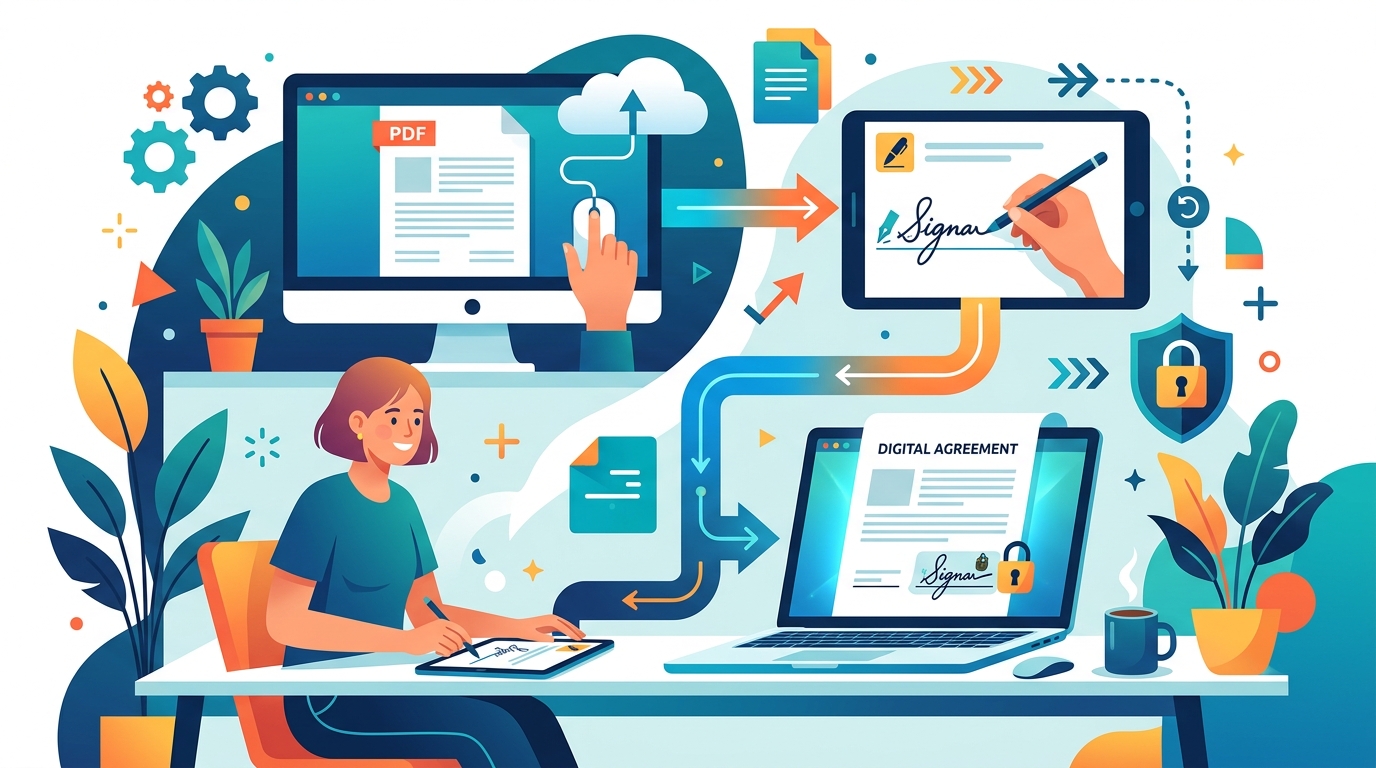
Here’s a step-by-step guide to signing your PDF documents online:
Step 1: Access the Doffl PDF Toolkit
Navigate to the PDF Toolkit page on Doffl.com. You'll find a range of PDF tools available there. Look for the 'Sign PDF' option or simply upload your PDF to the general toolkit and select the signing function.
Step 2: Upload Your PDF Document
Click on the 'Upload PDF' button or drag and drop your PDF file into the designated area. The tool supports various PDF sizes, but for very large files, consider using a PDF Compressor first to ensure faster upload times.
Step 3: Create Your Signature
Once your PDF is uploaded, the signing interface will appear. You will typically have a few options to create your signature:
- Draw: Use your mouse or trackpad to draw your signature directly on the screen. For touch-enabled devices, you can use your finger or a stylus for a more natural feel.
- Type: Type your name, and the tool will convert it into a stylish, signature-like font.
- Upload: If you have an image of your signature (e.g., a scan of your handwritten signature on a white background), you can upload it. Ensure the background is transparent for a professional look.
Choose the method that suits you best. You can usually preview your signature and adjust its size and color.
Step 4: Place Your Signature on the PDF
After creating your signature, it will appear on the document. You can then drag and drop it to the desired location on your PDF. Most tools allow you to resize, rotate, and reposition the signature until it looks perfect. If you need to add text fields for dates or other information, some advanced tools offer this functionality as well.
Step 5: Apply and Download the Signed PDF
Once you are satisfied with the placement and appearance of your signature, click on the 'Apply' or 'Sign' button. The tool will process your document, embedding the signature. After processing, you can download your legally signed PDF document directly to your device. It's that simple!
Other Online PDF Signing Options and Best Practices
While Doffl's PDF Toolkit provides a robust solution, it's good to be aware of other approaches and general best practices.
Using Other Online E-signature Platforms
Many dedicated e-signature platforms (e.g., DocuSign, Adobe Sign, HelloSign) offer more advanced features like sending documents for multiple signatures, workflow automation, and stronger legal compliance frameworks. While some offer free trials, they usually come with a subscription fee. For occasional use, free online tools are often sufficient.
Leveraging PDF Readers with Signing Capabilities
Desktop PDF readers like Adobe Acrobat Reader DC also offer signing features. You can create a signature and place it on a PDF. However, this requires installing software and doesn't offer the same browser-based convenience as online tools.
Best Practices for Online PDF Signing
- Verify the Document: Always double-check that you are signing the correct version of the document and that all details are accurate before applying your signature.
- Understand Legal Validity: While e-signatures are legally recognized, specific regulations can vary by country and type of document. For highly critical legal or financial documents, consult with a legal professional.
- Use Secure Platforms: Only use reputable online tools that prioritize data security and privacy. Look for SSL encryption (HTTPS) in the URL.
- Keep Records: After signing, download and save a copy of the signed document for your records. Some platforms also provide an audit trail or certificate of completion.
- Review Terms and Conditions: Especially when using third-party services, be aware of their terms regarding data handling and document storage.
Beyond Signing: Other Useful PDF Tools
Signing is just one aspect of PDF management. Doffl offers a suite of tools to help you with various PDF needs:
- Excel to PDF Converter: Convert your spreadsheets into professional PDF documents, perfect for reports or invoices.
- PDF Bookmarking: Enhance navigation in long PDF documents by adding bookmarks, making it easier for readers to jump to specific sections.
- PDF to Long Image: Convert multi-page PDFs into a single, scrollable image, ideal for web display or sharing on social media.
- Online Results Announcement: While not directly for signing, this tool helps institutions manage and securely distribute student results as PDFs, showcasing the versatility of PDF documents in administrative tasks.
These tools, alongside the PDF Toolkit, empower you to manage your documents entirely digitally, reducing reliance on physical paper processes.
Conclusion
Learning how to sign a PDF online without printing it is a fundamental skill in today's digital landscape. It's a simple change that brings significant benefits in terms of efficiency, cost savings, and environmental responsibility. By utilizing free and accessible online tools like Doffl's PDF Toolkit, you can seamlessly integrate digital signatures into your personal and professional workflows. Embrace the paperless future and experience the convenience of signing documents with just a few clicks.
Ready to transform your document workflow? Try Doffl's PDF Toolkit today and sign your first PDF online in minutes!
Tags: PDF, e-signature, online tools, productivity, documents